Is your Simplehuman trash can sensor not working right when you need it most? It’s frustrating when you rely on that hands-free convenience, only to find the sensor unresponsive or slow.
You might be wondering why this happens and how to fix it quickly. Don’t worry—this guide will help you understand the common reasons behind the problem and show you simple steps to get your trash can working smoothly again. Keep reading to bring back that effortless, touch-free experience you deserve.

Credit: www.simplehuman.com
Common Sensor Issues
The Simplehuman trash can sensor may stop working due to common issues. These problems often affect the sensor’s ability to detect motion. Understanding these issues helps fix the sensor quickly. Below are the most frequent causes that block the sensor from working properly.
Power And Battery Check
The sensor needs power to operate. Weak or dead batteries cause the sensor to fail. Replace the batteries with fresh ones to restore function. Check if the battery is placed correctly. Loose battery connections can also stop the sensor.
Sensor Obstructions
Dirt or grime on the sensor lens blocks the signal. Clean the sensor gently with a soft cloth. Objects placed too close to the sensor can cause confusion. Keep the sensor area clear for accurate detection. Even strong sunlight or reflections can interfere with the sensor.
Connection Problems
Internal wiring issues may affect the sensor’s connection. The sensor may not communicate with the trash can’s control system. Check for loose or damaged wires inside the lid. Sometimes, resetting the trash can helps restore the connection.
Resetting The Sensor
Resetting the sensor on your Simplehuman trash can can fix many common issues. This process helps clear any errors or glitches. It restores the sensor’s normal function quickly. Follow these simple steps to reset the sensor safely and easily.
Manual Reset Steps
Start by unplugging the trash can’s power source. Wait for about one minute. This pause helps the sensor clear its memory. Plug the power back in after the wait. Open and close the lid manually a few times. This action signals the sensor to recalibrate. Check if the sensor now works properly.
Using The Reset Button
Locate the reset button on the trash can. It is usually near the sensor or battery compartment. Press and hold the reset button for five seconds. Release the button and wait for the sensor to restart. This method resets the sensor’s settings to default. Test the sensor by waving your hand in front of it.
Cleaning The Sensor
Cleaning the sensor of your Simplehuman trash can is important for its proper function. Dirt and smudges can block the sensor’s view. This makes the lid stop opening or closing automatically. Regular cleaning keeps the sensor clear and responsive. Use gentle methods to avoid causing damage.
Safe Cleaning Methods
Turn off the trash can before cleaning. Use a soft, dry cloth to wipe the sensor gently. Avoid using water directly on the sensor. If needed, dampen the cloth slightly with water or mild soap. Wipe the sensor carefully and dry it right away. This removes dirt without harming the sensor.
Avoiding Damage
Do not use harsh chemicals or abrasive materials. These can scratch or damage the sensor surface. Avoid spraying cleaners directly on the sensor. Do not scrub the sensor hard. Keep the sensor dry to prevent electrical problems. Gentle care extends the sensor’s life and keeps it working well.

Credit: www.reddit.com
Adjusting Sensor Settings
Adjusting the sensor settings on your Simplehuman trash can can solve many issues. The sensor may not work properly if the settings are off. Small changes can make a big difference in how the sensor reacts.
Sensitivity Levels
The sensor has different sensitivity levels. These control how close your hand or object must be to open the lid. If the sensor is too sensitive, the lid may open on its own. If it is not sensitive enough, it may not open when needed.
Try lowering or raising the sensitivity to find the best setting. Use the buttons or controls on the trash can to adjust this. Test the sensor after each change to see how it works.
Positioning The Sensor
The sensor’s position affects how well it detects motion. Make sure nothing blocks the sensor’s view. Dirt or stickers can cover the sensor and stop it from working.
Place your hand directly in front of the sensor, not too far or too close. The sensor works best within a certain range. Move your hand slowly to see if the sensor reacts.
Replacing Batteries
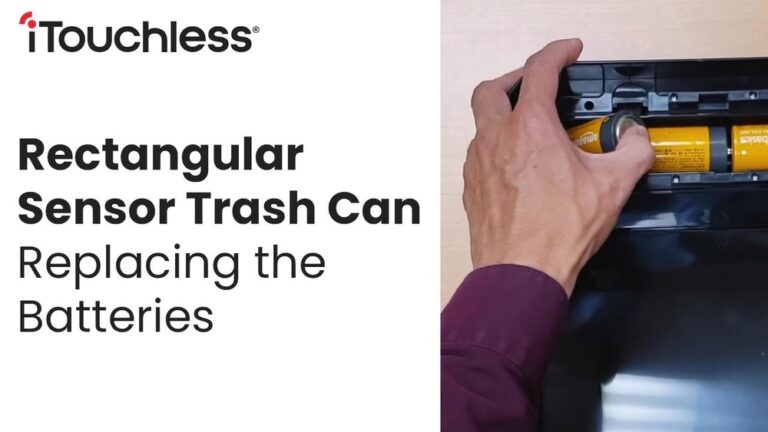
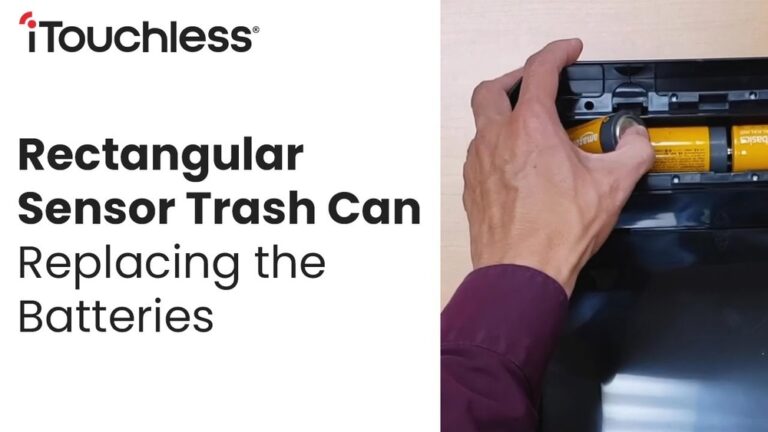
Replacing the batteries in your Simplehuman trash can sensor is often the first step to fix sensor issues. Over time, batteries lose power and affect the sensor’s ability to work properly. Knowing which batteries to use and how to install them correctly can save time and effort.
Battery Types
Simplehuman trash cans usually use AA or AAA batteries. Check the user manual or inside the battery compartment for exact type. Use high-quality alkaline batteries for better performance. Avoid rechargeable batteries unless the manual says they are compatible. Fresh batteries ensure the sensor gets enough power.
Proper Installation
Open the battery compartment carefully without forcing it. Insert batteries following the plus (+) and minus (-) signs. Incorrect placement can stop the sensor from working. Close the compartment tightly to protect batteries from moisture. After installing, test the sensor by waving your hand near it. Proper installation helps the sensor respond quickly and reliably.
Credit: www.simplehuman.com
When To Contact Support
The Simplehuman trash can sensor may stop working for various reasons. Knowing when to contact support can save time and avoid frustration. Some problems need expert help. Others can be fixed at home. This section guides you on when to reach out for support.
Warranty And Repairs
Check if your trash can is still under warranty. Simplehuman offers a limited warranty on most products. If the sensor fails within this period, repairs may be free. Avoid opening or fixing the sensor yourself. This can void the warranty. Contact support for repair or replacement options. Keep your purchase receipt handy for faster service.
Customer Service Tips
Have your trash can model and serial number ready. Describe the problem clearly and calmly. Mention any troubleshooting steps you have tried. Ask about repair costs if your warranty expired. Request advice on safe cleaning or maintenance. Customer service can guide you through simple fixes. Be patient and polite for better assistance.
Conclusion
Simplehuman trash can sensors may stop working for several reasons. Check the batteries first and replace them if needed. Clean the sensor area gently to remove dust or dirt. Make sure the sensor is not blocked or covered. Reset the trash can by unplugging it and plugging it back in.
These easy steps often fix sensor problems quickly. Keep your trash can working well with simple care and attention. Small fixes save time and avoid frustration. You can enjoy the convenience of your trash can again soon.